Mean Hamster support
Which product do you need help with?
Start with your product. Find the matching download, requirements and instructions, or get in touch.
HamsterOS for PCs
Choose a disk image, check hardware and controls, or find application and developer documentation.
HamNet, HamChat & HamConnect
Choose your computer and package. HamNet and HamChat are free; HamNet+ is an optional service.
Game compilers & MPE
Check supported games, original editions and hardware requirements.
HamsterWeazle
Get the right Windows or Mac build and check the GreaseWeazle adapter, drive and runtime requirements.
Games & releases
Find the game’s platform, availability and instructions, including current physical and digital releases.
Purchases & account
Find downloads, order history, tracking and subscription controls, or ask about an order.
For PawPrints 3D orders, visit PawPrints 3D or email support@meanhamster.com.
Mean Hamster community
Join us on Discord.
Ask questions, share what you’re working on, or talk classic computers. There are rooms for support, developers, MPE, AGI, Atari, Amiga and C64.
Support / Game compilers
Game compiler help.
Supported editions, cartridge requirements and a few answers to help you get playing.
From download to first game.
Choose your original files or output folder in the selection window. If you cancel, open it again to retry. Any selection problem appears in the app with a clear message.
Sierra Game Compiler / Native games
- Choose your computer tab in the Windows or Mac compiler. AGI-64 is for C64; AGI-ANTIC is for Atari.
- Check the expected original edition below. Use Locate files on a game card, choose its extracted original folder, then Check files and Include. Use the card menu to change the folder later.
- Choose your output folder and cartridge options. Review & Prepare shows your selections and approximate storage before you start preparing.
- Use Cancel if you need to stop preparation. The completed report lists outputs and any failures, with View log for details. Transfer the resulting cartridge image to compatible hardware; the computer’s CPU runs the game.
Mac setup (2.3.14): download the Apple Silicon or Intel ZIP matching your Mac, extract it, drag the Sierra Game Compiler app to Applications and open it. Allow access to your original game folders and external or removable drives if macOS asks.
The Mac app is signed and Apple-notarized. Confirm macOS’s first-launch prompt if asked.
For expanded 4 MiB EasyFlash images, check the firmware and emulator requirements in the FAQ. Experimental targets need their own requirements and validation.
ADAM F18A Enhanced: King’s Quest I and Space Quest I require F18A firmware 1.9, 128 KiB total RAM and 2 MiB media, plus a supported original DOS edition. Choose the standard edition for the existing ADAM version. Performance varies by scene; enhanced editions remain experimental.
MPE / Cartridge-assisted play
- Choose your cartridge tab in MPE for Windows or Mac. Each tab remembers its own storage and settings.
- First installation: use MPE’s guided erase-first installer for A8Pico Solo/Duo, PicoPEB or PiCOLECO. It shows BOOTSEL, asks before erasing and sends firmware directly to the selected board. RAD loads its supplied system directly from SD.
- Choose optional HamsterOS and your original files. Use Check files and Include on the game cards, then Review & Prepare to review estimated storage and start preparation. Include and Remove save immediately.
- Complete the firmware installation, safely eject the prepared storage and follow the cartridge’s launch instructions. The preparation computer is not required while playing.
Mac setup (2.3.15): download the Apple Silicon or Intel ZIP matching your Mac, extract it, drag the MPE app to Applications and open it. Allow access to your original game folders and external or removable drives if macOS asks.
Space Ace on Mac: use the supported ReadySoft DOS CD image, just as on Windows.
Windows, Apple Silicon and Intel Mac prepare the supported PrismA8+ colour Sierra adventures locally, including first use. Intel builds were checked under Rosetta; physical Intel testing remains open.
The Mac app is signed and Apple-notarized. Confirm macOS’s first-launch prompt if asked.
Follow the setup and update instructions in the app for your cartridge. What is BOOTSEL? See the button and first-install steps ↓
A8PicoCart & A8PicoDuo: use built-in flash storage, with no SD card. Remove the cartridge from your Atari, connect it to your PC or Mac with a USB data cable, and select its normal USB storage drive in MPE. After preparation, safely eject it and disconnect USB before returning the cartridge to your Atari.
TI-99/4A + PicoPEB: choose the PicoPEB tab and prepare its SD card. For the first firmware installation, use the guided erase-first setup in Help → Firmware setup. It sends the eraser and matching factory firmware directly through BOOTSEL. HamsterOS and Classic stay in Pico flash; games and the CYW43 Wi-Fi support file stay on SD. Later prepared local firmware updates can install at power-on. Hold Home during startup for Classic recovery and update bypass.
ColecoVision / ADAM + PiCOLECO: choose its new tab for the five supported MPE games and HamsterOS. PiCOLECO uses built-in flash storage and adds compatible Super Game Module (SGM) support. Read the full USB mouse guide with adapter and connection photos.
C64 + RAD setup
- Use a RAD cartridge with a supported Raspberry Pi 3A+, your C64 and an SD card. A 1351-compatible mouse in port 1 is optional; C64 keyboard and joystick controls are retained.
- Choose the RAD tab in MPE for matching boot files, HamsterOS and RAD game editions. Locate your supported original games or ROMs, choose Include, then Review & Prepare.
- Use the prepared SD card in RAD and turn on the C64. RAD boots directly from SD; no Raspberry Pi OS installation is needed. Keep the card installed for the desktop and games.
- Use the left cartridge button for the RAD text launcher and the right button to restart HamsterOS. Add or update supported games as separate MPE packages, keeping the matching boot and recovery files.
HamNet uses the Pi’s Wi-Fi. Drive 8/9 and Disk Utility use the C64’s IEC port; supported drive commands depend on the attached hardware. Copy IEC documents to SD before opening them in desktop applications.
First firmware installation · A8PicoCart, A8PicoDuo, PicoPEB & PiCOLECO
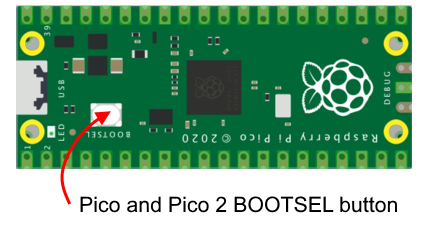
What is BOOTSEL, and where is it?
BOOTSEL is a small physical button on the Raspberry Pi Pico board inside your cartridge. It is not a program to run on your PC, Mac, Atari or TI.
Holding this button while connecting USB puts the Pico into firmware-installation mode. The cartridge’s ordinary reset button does not do the same thing. Some cases need to be opened to reach BOOTSEL; others provide access.
Usually a one-time setup: after the matching MPE firmware is installed, compatible routine updates use MPE’s USB updater or the cartridge’s update file. You normally keep the case closed. BOOTSEL remains available for recovery.
Already running matching full MPE firmware? Select normal cartridge USB storage and choose Review & Prepare. Confirm your completed BOOTSEL installation once if prompted; adding games or HamsterOS does not require another erase or flash. MPE manages compatible later updates using FIRMWARE.UPD. An older protected-startup installation may need one complete factory repair. If the live firmware cannot be read, reconnect normal USB storage and retry.
First installation: erase, wait, install
Back up the cartridge first. Erasing removes the selected Pico’s firmware, games, settings and saves. The wizard asks for your consent before it starts. Your preparation computer and separate SD card are preserved.
- Open First-time install / erase cartridge in MPE. Choose Cartridge & firmware options or Help → Firmware Setup. You can start before choosing normal cartridge storage.
- Disconnect console power and USB. Open the cartridge case if needed to reach the board’s BOOTSEL button and USB connector. Hold BOOTSEL while connecting that board to your PC or Mac with a USB data cable, then select its temporary RPI-RP2 drive in MPE.
- Choose Erase selected board. MPE sends the matching eraser directly. Keep USB connected and wait for the firmware drive to disappear and return; follow the wizard’s completion message.
- Select that same board again and choose Install firmware. MPE sends the matching complete factory image directly. There is no copying firmware to normal cartridge storage and back.
- For Duo, repeat on its other Pico. Complete erase and installation on both Library A/U1 and Library B/U2, one board and one USB cable at a time.
- Follow the final reconnect and verification steps. Safely disconnect USB before closing the case and returning the cartridge to your computer or console. A delivered firmware file and a verified running firmware are separate steps.
This guided factory setup covers A8PicoCart/Solo, A8PicoDuo, PicoPEB and PiCOLECO. Choose the exact cartridge and board shown by the app.
Routine updates preserve storage. Use the matching update instructions in MPE. Erase is an explicit first-install or recovery operation; an unknown firmware version does not automatically erase your cartridge.
Later updates: use MPE’s compatible USB updater for Atari, or follow its manual FIRMWARE.UPD instructions using the cartridge’s normal USB storage. A prepared PicoPEB PICOPEB-UPDATE.MHU on its SD card installs at TI power-on. For PiCOLECO, follow its matching update instructions in MPE. Use normal game storage for these update files, rather than the temporary BOOTSEL drive.
No firmware drive? Check that the cable carries data, hold BOOTSEL before plugging USB in, and check that you are pressing the Pico’s button. See Raspberry Pi’s Pico documentation for the button and USB mode.
PiCOLECO / ColecoVision & ADAM
Use a USB mouse with PiCOLECO.
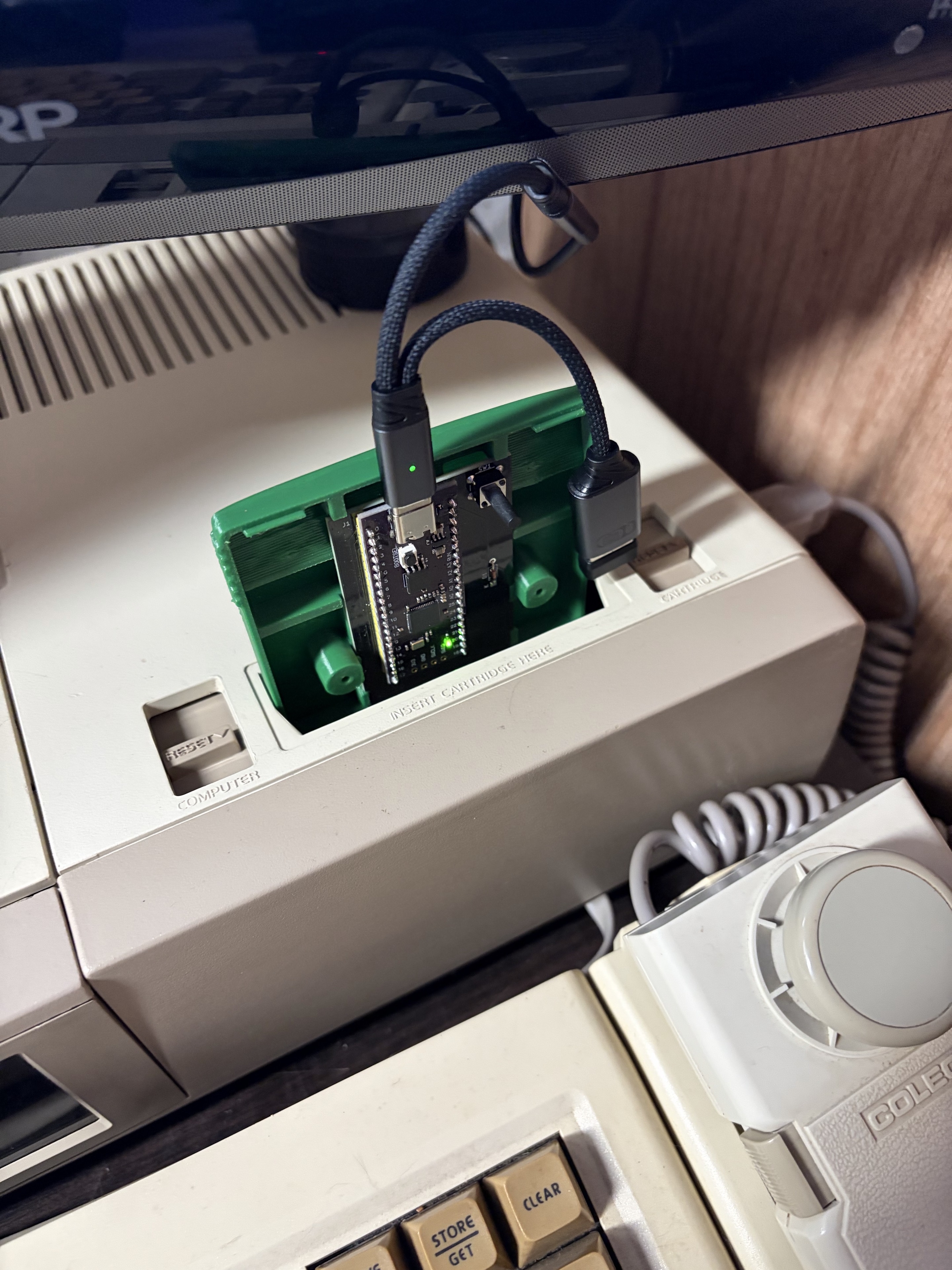
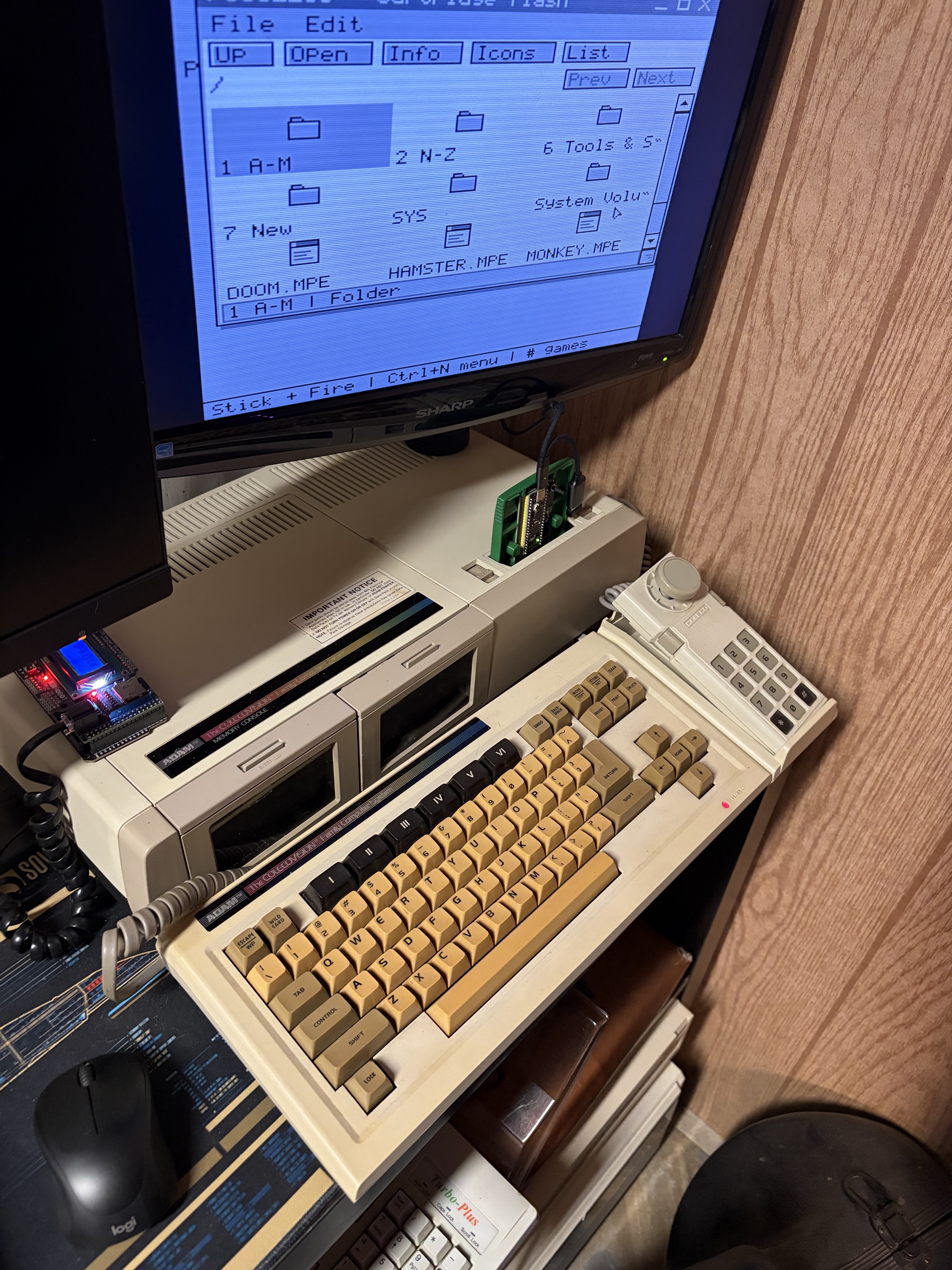
A compatible USB OTG adapter connects your mouse to PiCOLECO. We’ve tested the Jadebones USB-C to USB OTG Cable and Charger Adapter with a mouse in HamsterOS, Monkey Island and the Sierra games.
The close-up shows the adapter connection on an ADAM. The full setup shows the mouse beside the keyboard with HamsterOS open. PiCOLECO also adds Super Game Module (SGM) support for compatible games.
Before you build
Find your game. Check your edition.
Choose a compiler to see its supported games and expected original input.
Sierra Game Compiler 2.3.14 for Windows, Apple Silicon Mac and Intel Mac builds 17 AGI adventures for C64 and the same 17 for Atari XL/XE, using each computer’s own CPU. King’s Quest I and Space Quest I also have Highly Experimental MSX2, Coleco ADAM and TI-99/4A builds. The Black Cauldron is also available for TI-99/4A, and King’s Quest II and III are available for MSX2, all Highly Experimental. TI-99/4A exports on Apple Silicon require Rosetta 2. Other Games includes native Atari Monkey Island and M.U.L.E.+, native C64 titles, M.U.L.E.+ for the C128’s 40-column VIC display and standard-video or F18A M.U.L.E.+ for NTSC Coleco ADAM.
24 entries
| Supported game | Expected version / input |
|---|---|
| Original Sierra AGI adventures | |
| The Black CauldronC64 / Atari XL/XEHighly Experimental: TI-99/4A | DOS · game 2.00 · June 14, 1987AGI 2.439Requires 32 KiB memory expansion. Full-game and real-hardware testing are still open. |
| Donald Duck’s PlaygroundC64 / Atari XL/XE | Al Lowe’s download · version 1.0C · April 27, 1987Amiga game data · AGI 2.272. Select the single extracted game folder; no separate DOS copy is needed. |
| Gold Rush!C64 / Atari XL/XE | DOS 3.5-inch · game 2.01 · December 22, 1988AGI 3.002.149 |
| King’s Quest IC64 / Atari XL/XEHighly Experimental: MSX2 / Coleco ADAM / TI-99/4A | Original DOS AGI edition · AGI 2.917ADAM requires 128 KB RAM. These three systems still need full-game and real-hardware testing. |
| King’s Quest IIC64 / Atari XL/XEHighly Experimental: MSX2 | DOS · game 2.2 · May 7, 1987AGI 2.426. Atari requires MegaMax 2 MB cartridge capacity.Full-game and real-hardware testing are still open. |
| King’s Quest IIIC64 / Atari XL/XEHighly Experimental: MSX2 | DOS 3.5-inch · game 2.14 · March 15, 1988AGI 2.936Full-game and real-hardware testing are still open. |
| King’s Quest IV (AGI)C64 / Atari XL/XE | Original DOS EGA / AGI edition · AGI 3.002.086Choose the AGI release; the SCI edition uses a different engine. |
| Leisure Suit LarryC64 / Atari XL/XE | DOS · game 1.00 · June 1, 1987AGI 2.440 |
| Manhunter: New YorkC64 / Atari XL/XE | DOS 3.5-inch · game 1.22 · August 31, 1988AGI 3.002.107 |
| Manhunter 2: San FranciscoC64 / Atari XL/XE | DOS 3.5-inch · game 3.02 · July 26, 1989AGI 3.002.149 |
| Mixed-Up Mother GooseC64 / Atari XL/XE | Original DOS edition · November 10, 1987AGI 2.915 |
| Police Quest IC64 / Atari XL/XE | DOS · game 2.0G · December 3, 1987AGI 2.917. Atari requires MegaMax 2 MB cartridge capacity. |
| Space Quest IC64 / Atari XL/XEHighly Experimental: MSX2 / Coleco ADAM / TI-99/4A | DOS · game 2.2 · May 7, 1987AGI 2.426ADAM requires 128 KB RAM. These three systems still need full-game and real-hardware testing. |
| Space Quest IIC64 / Atari XL/XE | DOS 3.5-inch · game 2.0F · January 5, 1989AGI 2.936. Atari requires MegaMax 2 MB cartridge capacity. |
| AGI fan adventures | |
| King’s Quest VI AGI DemakeC64 / Atari XL/XE | Brandon Kouri’s AGI fan game · August 30, 2024AGI 2.917 |
| Space Quest 0: ReplicatedC64 / Atari XL/XE | Replicated 1.04 · AGI v2 fan game |
| Space Quest: The Lost ChapterC64 / Atari XL/XE | Vonster D Monster’s AGI fan game · version 10.0AGI 2.917 · Windows compiler 1.1.16. Supply the complete supported game folder. Atari requires 2 MB cartridge capacity. |
| Other Games | |
| Another World — C64 1MHz Stock VersionC64 | Supported original Amiga two-disk ADF pair or extracted game folderSelect the folder containing both supported original ADF disks; no manual extraction is needed. Extracted another and bank files remain supported. Builds a 4 MiB EasyFlash cartridge. |
| The Secret of Monkey Island — Atari NativeAtari XL/XE | Supported English DOS EGA four-disk files, including MONKEY.EXE128 KiB XL/XE · 4 MiB Type-63 CAR · blank save ATR included; mount as D1. Keep using your existing save ATR when updating. |
| M.U.L.E.+ — Atari NativeAtari XL/XE | Included with the compiler · no original files required64 KiB XL/XE · 1 MiB Atarimax cartridge · one to four players with MultiJoy 4 support. Saving is unavailable in this edition. |
| M.U.L.E.+ — ADAM StandardColeco ADAM | Included with the compiler · no original game files requiredNTSC Coleco ADAM · standard video · 128 KiB RAM and ADAMnet disk storage · included MHS score · two controllers for up to four humans using sticks and keypads. Saving is unavailable. |
| M.U.L.E.+ — ADAM F18AColeco ADAM | Included with the compiler · no original game files requiredNTSC Coleco ADAM · F18A video · 128 KiB RAM and ADAMnet disk storage · included MHS score · two controllers for up to four humans using sticks and keypads. Saving is unavailable. |
| M.U.L.E.+ — C64 1MHz NativeC64 | Included with the compiler · no original game files requiredOptional original title music: supply the matching M_U_L_E.sid file. |
| M.U.L.E.+ — C128 NativeC128 | Included with the compiler · no original game files required128KB C128 · 40-column VIC display · Magic Desk 128 cartridge · included MHS score · one to four humans plus AI. No VDC upgrade required. Saving is unavailable. |
MPE Compiler 2.3.15 enhances games with supported hardware. Check the device listed under each title; availability differs between TeensyROM+, Kung Fu Flash 2, A8PicoCart, A8PicoDuo, RAD and TI-99/4A PicoPEB, plus PiCOLECO for ColecoVision and ADAM. Version 2.3.15 is available for Windows, Apple Silicon Mac and Intel Mac. RAD and PicoPEB have their own editions below. Follow the setup guide for the matching firmware and first installation.
84 entries
| Supported game | Expected version / input |
|---|---|
| ColecoVision / ADAM · PiCOLECO editions | |
| DoomColecoVision / ADAM · PiCOLECO | Included shareware episodeCompact multicolour graphics with updated HUD/detail controls. Stock video or supported F18A/Pico9918 enhancements. No expanded ADAM RAM is required for this port. |
| OutRunColecoVision / ADAM · PiCOLECO | Supported original OutRun revision B arcade ROM ZIPCompact multicolour graphics. |
| The Secret of Monkey IslandColecoVision / ADAM · PiCOLECO | Supported original DOS EGA game folder |
| King’s Quest IColecoVision / ADAM · PiCOLECO | Supported original DOS AGI 2.917 edition |
| Space Quest IColecoVision / ADAM · PiCOLECO | Supported original DOS game 2.2 / AGI 2.426 edition |
| King’s Quest IIColecoVision / ADAM · PiCOLECO | Supported original DOS AGI game folder |
| Space Quest IIColecoVision / ADAM · PiCOLECO | Supported original DOS AGI game folder |
| TI-99/4A · PicoPEB editions | |
| DoomTI-99/4A · PicoPEB | Included shareware episodeCompact multicolour graphics with updated HUD/detail controls. PicoPEB 0.8.19 and HamsterOS 0.4.4 are supplied. Stock TI video and compatible F18A/Pico9918 enhancements. |
| OutRunTI-99/4A · PicoPEB | Supported original OutRun revision B arcade ROM ZIPCompact multicolour graphics. |
| King’s Quest ITI-99/4A · PicoPEB | Supported original DOS AGI 2.917 editionFull MPE engine; separate from the native Sierra Game Compiler TI edition. |
| Space Quest ITI-99/4A · PicoPEB | Supported original DOS game 2.2 / AGI 2.426 edition |
| King’s Quest IITI-99/4A · PicoPEB | Supported original DOS game folder |
| Space Quest IITI-99/4A · PicoPEB | Supported original DOS game folder |
| The Secret of Monkey IslandTI-99/4A · PicoPEB | Supported original DOS EGA game folder |
| RAD · C64 editions | |
| Space Ace Color+C64 · RAD | Supported ReadySoft DOS CD imageColor+ starts enabled; C toggles colours. First preparation converts your original CD; later runs reuse verified private preparation data. |
| Xevious Color+C64 · RADExperimental | Supported original arcade ROM ZIP |
| The Secret of Monkey IslandC64 · RAD | Supported original DOS EGA game folderMPE interpreter edition. |
| Indiana Jones and the Fate of AtlantisC64 · RADExperimental | Supported DOS CD ATLANTIS.000 / ATLANTIS.001, monster.sof and your own supported MT32_CONTROL.ROM / MT32_PCM.ROM pairPrism+ graphics, PCM music and speech with original effects. Uses the matched RAD host supplied with Power Engine. Put the supported game files and both ROMs in the same folder. They are not supplied by MPE. |
| OutRunC64 · RAD | Supported original revision B arcade ROM ZIP |
| King’s Quest IC64 · RAD | Supported original DOS AGI 2.917 edition |
| Space Quest IC64 · RAD | Supported original DOS game 2.2 / AGI 2.426 edition |
| TritariC64 · RAD | Your own compatible Atari 2600, 5200 and 7800 ROMs |
| TriTendoC64 · RAD | Your own compatible Game Boy, Game Boy Color and NES ROMs |
| SegaTrioC64 · RAD | Your own compatible Game Gear, Master System and SG-1000 ROMs |
| Apple II VMC64 · RAD | Your own Apple firmware ROMs and supported disks |
| CoCo 3 VMC64 · RAD | Your own supported system ROMs, cartridges and disks |
| King’s Quest IIC64 · RAD | Supported original DOS AGI editionRAD Prism+ edition, separate from the native SGC export. |
| King’s Quest IIIC64 · RAD | Supported original DOS AGI editionRAD Prism+ edition, separate from the native SGC export. |
| King’s Quest IVC64 · RAD | Supported original DOS AGI editionRAD Prism+ edition, separate from the native SGC export. |
| Police Quest IC64 · RAD | Supported original DOS AGI editionRAD Prism+ edition, separate from the native SGC export. |
| Space Quest IIC64 · RAD | Supported original DOS AGI editionRAD Prism+ edition, separate from the native SGC export. |
| OutRunColor+C64 · RAD | Supported original arcade ROM ZIP |
| Double Dragon Color+C64 · RAD | Supported World arcade ROM ZIP with HD6309 sprite board |
| Gauntlet Color+C64 · RAD | Original four-player English rev 14 arcade ROM ZIP |
| Kung-Fu Master Color+C64 · RAD | Same supported World arcade ROM ZIP as TeensyROM+; matched PCM audio is included |
| LoomC64 · RAD | Supported DOS EGA v1.0 game folder · Prism+ and SID audio |
| Monkey Island 2C64 · RAD | Supported original DOS game folder · Prism+ and SID audio |
| The Colonel’s BequestC64 · RAD | Supported English DOS EGA game folder · Prism+ and SID audio |
| RAD-DoomC64 · RAD | Your own DOOM1.WAD · optional SOUNDFONT.SF2 |
| Sidewinder Color+C64 · RAD | Supported original Amiga Sidewinder .ADFColor+ starts enabled; C toggles colours. |
| Enhanced AGI adventures | |
| The Black CauldronC64 · TeensyROM+ / Kung Fu Flash 2 | DOS · game 2.00 · June 14, 1987AGI 2.439 |
| Donald Duck’s PlaygroundC64 · TeensyROM+ / Kung Fu Flash 2 | Al Lowe’s download · version 1.0C · April 27, 1987Amiga game data · AGI 2.272. Select the single extracted game folder; no separate DOS copy is needed. |
| Gold Rush!C64 · TeensyROM+ / Kung Fu Flash 2 | DOS 3.5-inch · game 2.01 · December 22, 1988AGI 3.002.149 |
| King’s Quest IC64 · TeensyROM+ / Kung Fu Flash 2 · Atari XL/XE / A8PicoCart / A8PicoDuo | Original DOS AGI edition · AGI 2.917 |
| King’s Quest IIC64 · TeensyROM+ / Kung Fu Flash 2 · Atari XL/XE / A8PicoCart / A8PicoDuo | DOS · game 2.2 · May 7, 1987AGI 2.426 |
| King’s Quest IIIC64 · TeensyROM+ / Kung Fu Flash 2 | DOS 3.5-inch · game 2.14 · March 15, 1988AGI 2.936 |
| King’s Quest IV (AGI)C64 · TeensyROM+ / Kung Fu Flash 2 | Original DOS EGA / AGI edition · AGI 3.002.086Choose the AGI release; the SCI edition uses a different engine. |
| Leisure Suit LarryC64 · TeensyROM+ / Kung Fu Flash 2 · Atari XL/XE / A8PicoCart / A8PicoDuo | DOS · game 1.00 · June 1, 1987AGI 2.440 |
| Manhunter: New YorkC64 · TeensyROM+ / Kung Fu Flash 2 | DOS 3.5-inch · game 1.22 · August 31, 1988AGI 3.002.107 |
| Manhunter 2: San FranciscoC64 · TeensyROM+ / Kung Fu Flash 2 | DOS 3.5-inch · game 3.02 · July 26, 1989AGI 3.002.149 |
| Mixed-Up Mother GooseC64 · TeensyROM+ / Kung Fu Flash 2 | Original DOS edition · November 10, 1987AGI 2.915 |
| Police Quest IC64 · TeensyROM+ / Kung Fu Flash 2 · Atari XL/XE / A8PicoCart / A8PicoDuo | DOS · game 2.0G · December 3, 1987AGI 2.917 |
| Space Quest IC64 · TeensyROM+ / Kung Fu Flash 2 · Atari XL/XE / A8PicoCart / A8PicoDuo | DOS · game 2.2 · May 7, 1987AGI 2.426 |
| Space Quest IIC64 · TeensyROM+ / Kung Fu Flash 2 · Atari XL/XE / A8PicoCart / A8PicoDuo | DOS 3.5-inch · game 2.0F · January 5, 1989AGI 2.936 |
| Sierra SCI adventures | |
| Leisure Suit Larry 2C64 · TeensyROM+ / Kung Fu Flash 2 | Supported original DOS EGA / SCI0 editionComplete RESOURCE.MAP and RESOURCE.001–006 inventory. |
| Police Quest II: The VengeanceC64 · TeensyROM+ / Kung Fu Flash 2 | English DOS EGA · game 1.002.011RESOURCE.MAP, RESOURCE.001–003, PATCH.000 and PATCH.101. |
| Space Quest IIIC64 · TeensyROM+ / Kung Fu Flash 2 | Supported DOS EGA / SCI0 · game 1.018Complete RESOURCE.MAP and RESOURCE.001–003 inventory. |
| The Colonel’s BequestC64 · TeensyROM+ / Kung Fu Flash 2 | Supported English DOS EGA / SCI0 editionRESOURCE.MAP, RESOURCE.001–004, SCRIPT.052 and TEXT.052. |
| LucasArts adventures | |
| Indiana Jones and the Fate of Atlantis — BasicC64 · TeensyROM+ | Supported original English DOS floppy ATLANTIS.000 / ATLANTIS.001, all six DOS installation disks, or the supported CD resource pairBasic uses Prism+ and Clear SID without speech, monster.sof, MT-32 ROMs or PCM companions. Installs separately from Advanced. |
| Indiana Jones and the Fate of Atlantis — Advanced (Experimental Talkie)C64 · TeensyROM+Experimental | Supported DOS CD ATLANTIS.000 / ATLANTIS.001, monster.sof and your own supported MT32_CONTROL.ROM / MT32_PCM.ROM pairPut all five files in the same folder. The PCM edition requires SIDKick Pico PCM8 and matching HamsterOS GUI firmware. Game files and ROMs are not supplied. |
| LoomC64 · TeensyROM+ / Kung Fu Flash 2 · Atari XL/XE / A8PicoCart / A8PicoDuo | English DOS EGA 1.0 (March 8, 1990) or 1.1 (March 16, 1990) · SCUMM 3Supply the complete supported .LFL game folder. The TeensyROM+ edition is supported; the other editions remain experimental. |
| The Secret of Monkey IslandC64 · TeensyROM+ / Kung Fu Flash 2 · Atari XL/XE / A8PicoCart / A8PicoDuo | Original DOS EGA · SCUMM 4Supply the complete supported .LFL / DISK*.LEC game folder. Atari support is Highly Experimental; physical timing and full-game testing remain open. Duo copies the selected game from B to A before launch. |
| Monkey Island 2: LeChuck’s RevengeC64 · TeensyROM+ | Supported original DOS game folder |
| More games | |
| Another WorldC64 · TeensyROM+ / Kung Fu Flash 2 | Original Amiga edition · extracted game folderSupply another and the required bank files; the converter recognizes supported Amiga variants. |
| Dungeon MasterC64 · TeensyROM+Experimental | Original Amiga 2.0 English edition · extracted folder or OFS .ADF imageWindows MPE 2.1.7: supply GRAPHICS.DAT and DUNGEON.DAT. Experimental Prism+ player with original intro and doors, sound effects, mouse/joystick/keyboard controls and Save/Load. Original game data is not included. |
| Wing CommanderC64 · TeensyROM+ | Supported original DOS game filesComplete 40-mission Vega campaign, both endings and campaign saves. Windows MPE 2.2.0. |
| SidewinderC64 · TeensyROM+ | Supported original Amiga Sidewinder .ADF |
| CannonBall / OutRunC64 · TeensyROM+ · Atari XL/XE / A8PicoCart / A8PicoDuo | Original OutRun arcade revision B · complete ROM ZIP |
| DOOMC64 · TeensyROM+ / Kung Fu Flash 2 · Atari XL/XE / A8PicoCart / A8PicoDuo | Doom shareware 1.9 · DOOM1.WADC64: supply the supported shareware WAD. A8PicoCart / A8PicoDuo: the shareware episode is included; no original game folder is required. |
| Double DragonC64 · TeensyROM+ · Atari XL/XE / A8PicoDuo | World arcade programs with HD6309 sprite board · ddragonbl ROM setSupply the complete supported arcade ROM ZIP. |
| GauntletC64 · TeensyROM+ · Atari XL/XE / A8PicoDuo | Original Gauntlet arcade game (1985) · gauntlet.zipEnglish revision 14 (MAME set: gauntlet). Select the complete ROM ZIP without extracting it. |
| Might and Magic IV: Clouds of XeenC64 · TeensyROM+ / Kung Fu Flash 2 | Supported DOS World of Xeen filesXEEN.CC, DARK.CC and XEEN.DAT. |
| M.U.L.E.+C64 · TeensyROM+ / Kung Fu Flash 2 · Atari XL/XE / A8PicoCart / A8PicoDuo | Ready to install · no original game files requiredOptional original title music on C64: supply the matching M_U_L_E.sid file. |
| The Legend of KyrandiaC64 · TeensyROM+ / Kung Fu Flash 2Experimental | Original English DOS floppy editionSupply the supported original folder, or a verified prepared KYRANDIA.KYR. |
| XeviousC64 · TeensyROM+Experimental | Supported original arcade ROM ZIPExperimental arcade conversion with two-button controls. TeensyROM+ only. |
| Space HarrierC64 · TeensyROM+Experimental | Supported original arcade ROM ZIP and zoom PROMUpdated faster Space Harrier player. TeensyROM+ only. |
| Space AceC64 · TeensyROM+ | Supported ReadySoft DOS CD image |
| Kung-Fu MasterC64 · TeensyROM+ / Kung Fu Flash 2 · Atari XL/XE / A8PicoDuoExperimental | Supported original World arcade ROM ZIPExperimental MPE arcade conversion; separate from the native Atari editions. |
| Console and text-adventure players | |
| TriTendo — Game Boy / Game Boy Color / NESC64 · TeensyROM+ / Kung Fu Flash 2 · Atari XL/XE / A8PicoCart / A8PicoDuo | Compatible Game Boy, Game Boy Color and NES ROM filesCompatibility varies by game and cartridge mapper. Atari also accepts ZIP files, with battery saves and Genesis C/Space second-button controls. |
| Apple II VMC64 · TeensyROM+ / Kung Fu Flash 2 | Your own Apple firmware ROMs and supported II+ or original 128K IIe disksApple firmware ROMs are required to run and are not included. Windows MPE 2.2.0. |
| SegaTrio — Game Gear / Master System / SG-1000C64 · TeensyROM+ / Kung Fu Flash 2 · Atari XL/XE / A8PicoCart / A8PicoDuo | Compatible .gg, .sms and .sg ROM filesCompatibility and performance vary by system and mapper. Bring your own ROMs; existing ROM and save identities are preserved. |
| NES via TriTendoC64 · TeensyROM+ / Kung Fu Flash 2 | Compatible .nes ROM filesCompatibility varies by game and cartridge mapper. |
| Tritari — Atari 2600 / 5200 / 7800C64 · TeensyROM+ / Kung Fu Flash 2 · Atari XL/XE / A8PicoCart / A8PicoDuo | Compatible Atari ROM files · .a26, .a52, .a78, .bin or .romAccepted formats and compatibility vary by target. A8PicoCart uses its Atari ROM loader. |
| ZipZorkC64 · TeensyROM+ / Kung Fu Flash 2 | Supported Z-machine story files · .z1–.z6, .z8 or .datRuns in HamsterOS; graphics and compatibility vary by story. |
AGI and SCUMM numbers identify the original engine version. Game release numbers are listed separately where known. The compiler checks your files when you scan or prepare a game; use the complete recognized edition.
A few common questions
Native games & cartridge power.
What is BOOTSEL? Do I run it on my computer?
BOOTSEL is the small physical button on the Pico board inside your cartridge. It is not a program for your PC, Mac, Atari or TI. Hold it while connecting USB for a first firmware installation. See the button diagram, installation steps and later-update instructions above.
What’s the difference between the two compilers?
The Sierra Game Compiler creates native games that run on your classic computer’s own CPU. The Mean Hamster Power Engine for 8-Bits (MPE) teams up the computer’s own CPU with the processor inside a supported cartridge for enhanced games, emulators and peripheral features.
What does the Sierra Game Compiler support?
Sierra Game Compiler 2.3.14 for Windows, Apple Silicon Mac and Intel Mac supports 17 AGI adventures for both C64 and Atari XL/XE: 14 original Sierra titles and three fan adventures, including Space Quest: The Lost Chapter version 10.0. Other Games includes native C64 versions of Another World and M.U.L.E.+. These versions run without cartridge CPU assistance. The cartridge supplies storage, and the computer does the processing.
Native King’s Quest I and Space Quest I for C128 are also included, alongside Highly Experimental builds of King’s Quest I and Space Quest I for MSX2, Coleco ADAM and TI-99/4A. All six platform families can be prepared directly on Windows or Mac. For changes by version, read the Sierra Game Compiler release notes.
M.U.L.E.+ for C128 Native uses the 40-column VIC display, 128KB RAM and a Magic Desk 128 cartridge. It includes the MHS score and C64 artwork, supports one to four humans plus AI, and needs no original game files or VDC upgrade. Saving is unavailable.
What do the three Highly Experimental systems require?
- MSX2: 64 KB RAM, V9938/V9958 video and 128 KB VRAM. Both games produce 4 MiB ASCII16 cartridge ROMs.
- Coleco ADAM: 128 KB total RAM (64 KB internal plus a 64 KB expansion). Output is a 2 MiB ADAMnet disk image.
- TI-99/4A: standard 32 KB expansion RAM. Output includes an RPK and a 2 MiB banked cartridge BIN.
Both games have passed packaged compilation for each system. Full-game and real-hardware testing remain open.
What do native Atari games require?
Use an Atari XL/XE with at least 64 KB RAM, or an Atari 800 with an Incognito board or similar upgrade. King’s Quest II, Police Quest and Space Quest II require MegaMax 2 MB cartridge capacity. Space Quest: The Lost Chapter also requires a compatible 2 MB Atari cartridge format. Choose the Atari cartridge format offered by the compiler for your game.
Does Street Fighter II (SF2) work on A8Pico?
Despite our best efforts, Street Fighter II (SF2) specifically does not seem to work on A8Pico. The 4 MiB Type-63 cartridge image for our native Atari 8-bit Monkey Island conversion works on A8Pico.
What cartridge capacity do native C64 games need?
Depending on the game and build format, AGI releases use 1 MiB or 2 MiB cartridge images. Native Another World requires the expanded 4 MiB EasyFlash format. Your cartridge and firmware must support the selected format and capacity. A standard 1 MiB EasyFlash cartridge cannot hold a 4 MiB game. Native Atari builds use Atari cartridge formats.
Which devices support native 4 MiB EasyFlash ROMs?
- Kung Fu Flash 2: Our H17-and-later firmware supports read-only 4 MiB EasyFlash ROMs.
- TeensyROM+: Our updated firmware supports these ROMs too.
- Ultimate 64 / Ultimate 64-II: Official firmware 3.15 expanded cartridge storage to 4 MB. See the release notes.
- Ultimate-II+ / II+L: The 3.15a source includes 4 MiB cartridge storage and the required 256-bank EasyFlash addressing. Use a firmware build that includes this support. See the EasyFlash implementation.
Why won’t the 4 MiB Another World cartridge load in VICE?
Stock VICE 3.10 does not support this expanded EasyFlash format. We provide an experimental patch that adds read-only 2 MiB and 4 MiB support. Follow our VICE patch and build instructions to create a compatible build.
The same 4 MiB image has also been reported unable to run in Denise 2.7. A loading failure can be an emulator compatibility issue even when the generated cartridge is correct.
Which cartridges support MPE?
Released MPE support covers Kung Fu Flash 2, TeensyROM+ and RAD for C64, special TeensyROM+ C128 editions, A8PicoCart and A8PicoDuo for Atari XL/XE, and PicoPEB for TI-99/4A, plus PiCOLECO for ColecoVision and ADAM. MPE 2.3.15 is available for Windows, Apple Silicon Mac and Intel Mac.
PiCOLECO adds Super Game Module (SGM) support for compatible games. The USB mouse guide shows the tested OTG adapter and connection photos for HamsterOS, Monkey Island and the Sierra games.
We renamed the application Mean Hamster Power Engine for 8-Bits because more supported cartridges are joining the MPE family.
What does MPE add?
MPE combines cartridge processing with our display technology. On C64, Prism+ enables higher-resolution, EGA-style graphics for supported games such as The Secret of Monkey Island. MPE also supports SCI adventures such as Space Quest III.
The C64 still handles displaying the picture, input, SID sound and supported save/load features—including floppy saves where available. Games and features vary by cartridge.
Why do AGI games and Another World appear in both?
They offer two ways to play. Native versions run on the computer’s own CPU. MPE versions use cartridge assistance: AGI adventures retain their familiar appearance while benefiting from improved performance, and Another World gains a higher-resolution picture closer to the original.
Do I leave the preparation computer connected while playing?
No. The desktop app prepares the game files on your chosen storage. A8PicoCart and A8PicoDuo use built-in flash storage over USB; no SD card is needed. The classic computer runs the native game, or works with its MPE cartridge, when you play. The desktop app is also where you prepare later updates.
Does a cartridge with MPE firmware always use its processor for games?
No. Loading a native cartridge image still runs the game on the computer’s own CPU; the cartridge provides storage. Loading an MPE package uses its matching cartridge runtime for assistance. The game edition and launch format determine the approach.
Is HamsterOS required, and is it the same as the PC operating system?
HamsterOS for MPE is an optional desktop for the supported C64 and Atari cartridges. HamsterOS for PCs is a separate operating system with its own disk images and applications. Choose the download for your machine; their application packages are not interchangeable.
Does MPE emulate every game or replace every disk drive and mouse?
Features vary by cartridge, player and host computer. An emulator entry identifies an offered player, not compatibility with every ROM. Check its supported formats, controls, saves and device requirements. Mouse and disk features can involve emulation or supported physical hardware; follow the selected cartridge’s instructions.
Do the compilers include the original commercial games?
The tools are free to download. For supported commercial titles, you supply your own original game files; the compiler prepares them for your chosen computer and cartridge.